
You know the strategy you want. Play Plinko until a 10x lands, then switch to Keno for twenty bets, then switch back. Or: double after every loss, but cap the bet so one ugly streak can't drain the balance, and go back to the base bet instead of grinding to a halt.
Then you open the conditions in the game UI, and there's no way to say it. Conditions are good at on a win do this, on a loss do that. They are not built to remember anything, and most of the strategies people actually have in their heads need memory.
Code Mode can do all of it. It always could. It is also the part of Antebot Originals most people never touch, because it asks you to write JavaScript.
Antebot AI removes that step. You describe the strategy the way you'd describe it to a friend — game, bet size, what happens on a loss, when to stop — and it hands back a working Code Mode script you can insert with one click.
This guide walks through one real script from first message to running strategy, then covers the two skills that actually matter: how to describe what you want, and how to check what you got.
You can try it before you buy it. Every eligible user has 15 free messages, one time. Nothing to claim or activate: open the AI Scripter in Code Mode and start typing. After that it's €5 per 30 days, account-wide across every casino and username you play. The free messages run on the same model as the paid version, so nothing about them is a watered-down demo. See it in the store.
What You Can Build That Conditions Can't
If you've never hit the wall, this section won't mean much. If you have, this is the list:
- "Raise the bet only when my last 20 rolls are below average." — a rolling window over past results
- "Double on loss, but never above 0.00001000; if that would go over, start again from the base bet." — a cap that recovers instead of stopping
- "Play Plinko until I hit above 10x, then switch to Keno for 20 bets, then switch back." — one strategy across two games
- "Spread a $20 budget over 500 bets, and recalculate every 100 bets so the rest of the balance covers the rest of the bets." — arithmetic on your own session
- "Deposit to the vault every time profit crosses another 0.001 BTC." — a counter that survives the whole session
None of those fit in a conditions form. All of them are a few minutes of conversation.
Your First Script, Start to Finish
Here's a real exchange. The strategy is a martingale — the one everybody reaches for first — with the one twist the conditions UI can't express: a bet cap that resets instead of halting. The script below is exactly what came back, not a cleaned-up version.
The message I sent:
Dice at 49.5% win chance. Start at 0.00000010 and double on every loss,
reset to the starting bet on every win. But never let a single bet go
above 0.00001000 — if doubling would cross that, go back to the starting
bet instead of stopping. Count how many times that happens. Stop at $1
profit or $1 loss.
The first thing it did was look something up:
Fetching Dice game information… 49.5% win chance → exactly 2× multiplier. Clean Martingale with a cap. Generating now.
That's worth pausing on. I gave it a win chance; Code Mode sets dice by multiplier. It checked my casino's real dice table and did the conversion itself.
What came back. You do not need to read this. That's the whole point — skim it, notice it has labelled sections and a settings block at the top, and move on. Checking it comes later, and it doesn't involve reading code.
// === SECTION 1: Initialization (runs once when betting starts) ===

strategyTitle = 'Capped Martingale';
author = 'User';
version = '1.0';
scripter = 'Antebot';

if (isSimulationMode) {
    setSimulationBalance(100);
    resetSeed();
    resetStats();
    clearConsole();
}

// -------------------------------------------------------
// User-configurable settings
// -------------------------------------------------------
startingBet  = 0.00000010;   // Starting bet (crypto, not USD!)
betCap       = 0.00001000;   // Max allowed bet — resets to startingBet if doubling would exceed this
stopOnProfit = 1 / getConversionRate();  // $1 profit converted to crypto
stopOnLoss   = 1 / getConversionRate();  // $1 loss  converted to crypto

// -------------------------------------------------------
// DO NOT EDIT BELOW THIS LINE UNLESS YOU KNOW WHAT YOU ARE DOING
// -------------------------------------------------------

game    = 'dice';
betSize = startingBet;    // Bet size is always specified in crypto value, not USD!
initialBetSize = betSize;
target  = chanceToMultiplier(49.5);   // 2× at 49.5% win chance
betHigh = true;

capResetCount = 0;   // tracks how many times the cap was triggered

function logBanner() {
    log('#80EE51', `================================
${strategyTitle} v${version} by ${author}
================================
Scripted by ${scripter} for Antebot
-------------------------------------------
Starting bet : ${startingBet}
Bet cap      : ${betCap}
Stop profit  : $1 (≈ ${stopOnProfit.toFixed(8)} ${currency})
Stop loss    : $1 (≈ ${stopOnLoss.toFixed(8)} ${currency})
-------------------------------------------
`);
}
logBanner();

// === SECTION 2: Main engine callback (runs after every bet) ===

engine.onBetPlaced(async (lastBet) => {
    if (lastBet.win) {
        betSize = initialBetSize;
    } else {
        let nextBet = betSize * 2;
        if (nextBet > betCap) {
            capResetCount++;
            log('#FFA500', `Cap hit #${capResetCount} — next bet (${nextBet.toFixed(8)}) would exceed ${betCap}. Resetting to starting bet.`);
            betSize = initialBetSize;
        } else {
            betSize = nextBet;
        }
    }

    // Stop conditions (USD-denominated, converted to crypto at session start)
    if (profit >= stopOnProfit) {
        log('#4FFB4F', `Profit target reached! +${(profit * getConversionRate()).toFixed(2)} USD | Cap resets: ${capResetCount}`);
        engine.stop();
    }
    if (profit <= -Math.abs(stopOnLoss)) {
        log('#FF0000', `Stop loss reached! ${(profit * getConversionRate()).toFixed(2)} USD | Cap resets: ${capResetCount}`);
        engine.stop();
    }
});

// === SECTION 3: Stop callback ===

engine.onBettingStopped((isManualStop, lastError) => {
    playHitSound();
    log(`Betting stopped. Profit: ${(profit * getConversionRate()).toFixed(4)} USD | Cap resets: ${capResetCount}`);
});
Four things to notice without reading a line of it:
- It's sim-ready out of the box. That
if (isSimulationMode)block gives you a clean 100-unit balance and fresh stats every run, so you can test immediately. - The knobs are at the top, labelled.
startingBet,betCap, and the two stop values sit above a "don't edit below this line" marker. You can retune the strategy without touching the logic. - It prints its own settings on start. That banner block dumps the starting bet, the cap and both stops into the console the moment you hit Start — which is the first thing to check them against.
- It logs when the cap fires. That's the counter I asked for, and it's what makes the next step possible.
Underneath the script comes a plain-English summary of what it built and which settings you can tune:
Standard Martingale on Dice at 49.5% win chance (2× multiplier) — double after every loss, reset to 0.00000010 on every win. If doubling would exceed the 0.00001000 cap, the bet resets to the starting amount instead, and the cap-hit counter increments.
Sanity-check the numbers. The script and the summary describing it are two different pieces of writing, so when a number in the summary matters to you — how deep a losing streak runs before something triggers, how many bets until a stop — spend the fifteen seconds to check it yourself. Here that means doubling from the starting bet until you clear the cap: 0.00000010 → 20 → 40 → 80 → 160 → 320 → 640, and the next double would be 0.00001280, over the 0.00001000 limit. Seven losses in a row, and the console will confirm it. Arithmetic you can do on your fingers beats a sentence you took on trust.
Here's that run in Simulation Mode, and the console settles it:
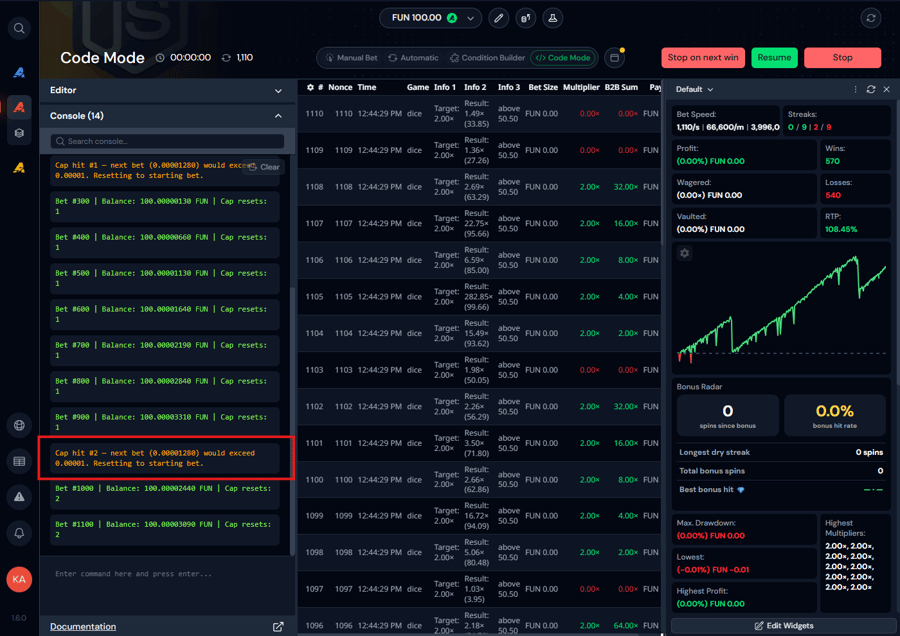
Cap hit #1 — next bet (0.00001280) would exceed 0.00001. Resetting to starting bet. That's the same 0.00001280 the arithmetic predicted, and it turned up twice inside 1,110 bets — about what a seven-loss streak should do. The strategy is running on FUN balance, so nothing here cost anything.
Asking for one change
With Send current tab as context ticked:
Log the balance and the cap counter every 100 bets. Don't change anything else.
What came back was the same script with exactly one block inserted, and it said so:
// Log balance and cap counter every 100 bets
if (rollNumber % 100 === 0) {
    log('#80EE51', `Bet #${rollNumber} | Balance: ${balance.toFixed(8)} ${currency} | Cap resets: ${capResetCount}`);
}
Only one block added — the
if (rollNumber % 100 === 0)check insideonBetPlaced, right after the bet-sizing logic. Everything else is identical to the previous script.
That's the rhythm to aim for. One instruction, one small diff, easy to eyeball. It's a very different experience from asking for five changes and getting back ninety lines you have to re-verify from scratch.
How to Check a Script You Can't Read
"Test it in Simulation Mode" is useless advice on its own if nobody tells you what to look at. Here's the checklist. It takes two minutes and it's the same every time.
- Is the first bet the size you asked for? If you said 0.00000010 and bet one is something else, stop there.
- Does it react to a loss the way you said? Watch two or three losses in a row and check the bet moves the way you described.
- Does it reset on a win? The most common silent bug is a strategy that escalates correctly and never comes back down.
- Let it hit your stop. Not "assume it will" — actually reach the profit target or the stop loss and confirm it halts at the number you gave, not somewhere near it.
- Watch where the bet size peaks. This is where money disappears. If a bet ever climbs somewhere you didn't expect, that's the finding.
Set small stop values for your first test run — a dollar or less — so the strategy actually reaches a stop while you're still watching. A test you abandon after ten minutes has verified nothing.
The one trick worth knowing: ask it to explain its own script back to you.
Explain this script back to me in plain English, step by step.
You get a numbered walkthrough — setup, what happens after every bet, what triggers a stop — which you can read against what you originally asked for. It's the closest thing to a code review you'll ever need to do.
Be clear-eyed about what that buys you, though. Explaining a script back is good at surfacing whole steps you forgot to ask for — a stop you never mentioned, a reset that isn't there. It is not proof that the numbers are right, because it's another description rather than the thing itself. Only running it proves the numbers.
How to Describe a Strategy
A good prompt isn't a long prompt, it's a specific one. Vague requests come back as clarifying questions instead of scripts, which turns a one-message job into a three-message one.
The four things worth stating every time:
| Element | Example |
|---|---|
| Game and its settings | "Dice at 49.5% win chance" · "Plinko, high risk, 16 rows" · "Mines with 5 mines, 3 tiles per round" |
| Bet size | "Start at 0.00000010" · "A thousandth of my balance" · "Flat $0.10" |
| Win and loss reaction | "Double on loss, reset on win" · "Increase 15% on loss" · "Double on win, reset after three wins" |
| Stop conditions | "Stop at $100 profit or $50 loss" · "Stop after 5,000 bets" |
Skip the bet size and it defaults to a thousandth of your balance. That's a sensible default, not a mind-reader — say the number when the number matters.
Do & Don't
| ❌ Don't write this | ✅ Write this instead | Why |
|---|---|---|
| "Build me a strategy." | "Build a martingale for dice at 2x: double on loss, reset on win, stop at $100 profit or $50 loss." | Vague gets you a question back. Specific gets you a script. |
| "Set dice to 49.5." | "Use a 49.5% win chance on dice." | Code Mode sets dice by multiplier. Say "win chance" and it looks up your casino's conversion. |
| "Add some logging." | "Log the balance and streak every 100 bets." | Scripts stay quiet by design so the console stays readable. Say what to log and how often. |
| "Rewrite it to also do Keno, and add a widget, and notify me, and change the sizing." | One request per message, with your script attached as context. | Big multi-part rewrites are where things get lost. Small edits are cheap to check. |
| Pasting a 3,000-line script into the message box. | Tick Send current tab as context, or attach the file. | The message box has a size limit. The context checkbox exists for exactly this. |
Prompts Worth Stealing
Copy these and adjust:
- "Martingale on dice at 2x. Double on loss, reset on win. Start at 0.00000010, stop at $100 profit or $50 loss."
- "Wager grinder for limbo at 1.01x, betting a thousandth of my balance, with a stop after 10,000 bets."
- "Mines with 5 mines: pick 3 random tiles per round, cash out, stop at $50 profit."
- "Plinko high risk 16 rows. On any win above 10x, switch to Keno with my 10 numbers for 20 bets, then switch back."
- "Combo hunt on limbo: chase three 5x wins in a row, double the bet on each win, reset on any loss."
- "Add a widget that tracks my worst loss streak and current profit."
- "Send a Telegram notification when the stop loss triggers."
- "Which Plinko bucket pays best at medium risk on my casino?"
Notice the pattern: widgets, notifications and logging are opt-in. It won't add them unless you ask, which is what keeps the scripts lean.
When It Gets It Wrong
It will, sometimes. Here's the repair loop.
If it throws a red error, hover the error in the Code Mode console and pick Explain this error. You get a one-sentence summary of what broke, the likely cause, and the smallest fix — it corrects the one wrong line rather than rewriting your script. It's tuned for the mistakes people actually make in Antebot: declaring let or const over an Antebot global, forgetting await on resetSeed() or depositToVault(), using lastBet outside the callback, or mixing up USD and crypto bet sizes.
If it runs but does the wrong thing, describe what you saw, not the fix you're imagining:
| ❌ | ✅ |
|---|---|
| "Add a stop condition, I think it's missing." | "It kept betting after I passed $1 profit." |
| "The martingale logic is broken." | "After a win it stayed at the raised bet instead of going back to 0.00000010." |
The second column gets a correct fix. The first sends it hunting for a problem you may have misdiagnosed.
If the strategy is big, build it in layers. Get the bet loop right and tested first. Then add the stops. Then add the widget, the notifications, the vault deposits. A forty-condition monster described in one message will come back as something plausible that you have no way to verify. Three rounds of one change each takes ten minutes longer and you'll actually trust the result.
What It Knows That a General Chatbot Doesn't
This is the reason to use the built-in assistant rather than pasting into a chatbot in another window:
- Every game, with the real rules. A built-in reference for all Antebot Originals games — Dice, Limbo, Keno, Mines, Plinko, Tower, Blackjack, Hilo, Roulette, Wheel, Baccarat, Coinflip, Cases, Diamonds, Pump, Chicken, Video Poker and more, plus supported slots. It knows each game's settings, which values are valid, and what comes back after every bet.
- Your casino's numbers. While writing, it looks up the real payouts, multipliers and odds for the casino you're logged into — that's the
chanceToMultiplier(49.5)in the walkthrough above, resolved against a live table rather than guessed. Ask which Plinko bucket pays best at medium risk and it checks. - Multi-game strategies. It can write a strategy that plays Plinko until something happens, switches to Keno, and switches back — including the setup that makes switching games work.
- The extras. Custom statistics widgets, notifications to Discord, Telegram, ntfy or any webhook, vault deposits, seed resets, currency conversion, stop-loss and stop-profit limits, and perfect-play Blackjack.
A general chatbot has never heard of engine.onBetPlaced, has no idea what your casino pays, and will happily invent a function that doesn't exist.
The Other Three Places It Shows Up
One subscription, four surfaces. The AI Scripter is the main event; these three are where the rest of the value hides.
Strategy Q&A
In the Strategy Manager, open any strategy — your own or one from the community — and switch to the Ask AI tab. You don't even have to think of a question: it offers the ones worth asking as one-tap starters.
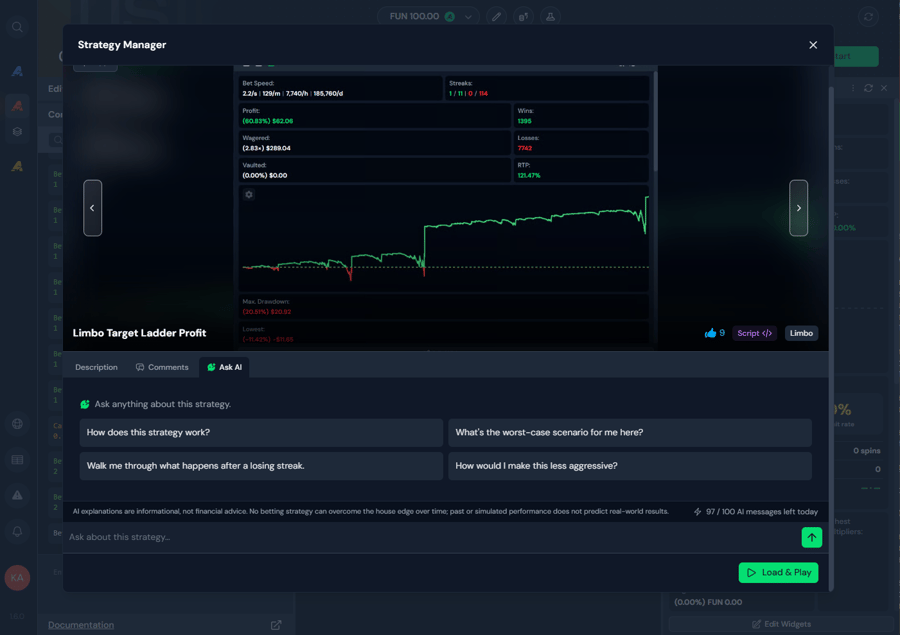
"What's the worst-case scenario for me here?" and "Walk me through what happens after a losing streak" are the two to press before you ever hit Load & Play — they're the questions a stats chart can't answer for you.
It reads both script strategies and no-code profile strategies, so you can finally understand that community strategy with 40 conditions before you run it with real money.
Widget Q&A
Community statistics widgets get the same treatment. Open a widget, hit Ask AI, and ask what it tracks or how one of its numbers is worked out. It reads the whole widget before answering, not just the part you happen to be looking at.
Error Explanations
Covered above — hover any red console error and pick Explain this error.
Working With Longer Conversations

- The indicator next to the message box shows how much of the conversation the AI is still holding on to — hover it for the exact figure. When it climbs, start a new chat. A fresh chat with your script attached beats a 40-message thread almost every time.
- Attachments let you hand it text files: an old script to port, an error log to diagnose, a list of results to look through. Text files only, no screenshots.
- Your remaining messages for the day sit right beside it, so you always know where you stand against the 100-a-day limit without going looking.
- Your chat history is saved on your own machine, and you can rename or delete any chat. A reply keeps generating even if you close the window.
- Every chat has a Thinking block you can expand. Worth a look when you want to understand why it built something the way it did.
What It Won't Do
Being straight about the limits saves you messages:
- It won't run, simulate or backtest anything. It writes the strategy. Testing it in Simulation Mode is your job.
- It won't promise profits. Ask for "a strategy that makes money" and you'll get a behaviour instead — nothing beats the house edge, and it won't pretend otherwise.
- It won't give bankroll or bet-size advice in currency terms. Ask "how much should I bet with $500?" and you'll get nowhere. Express the rule — "size bets at 0.2% of my balance" — and it'll build it.
- It stays on topic. It builds Antebot strategies. It's not a general programming assistant.
- It builds scripts, not no-code profiles. It can read and explain a profile strategy, but what it writes is a Code Mode script.
- It won't rewrite a community strategy or widget unless you explicitly ask it to.
- It never asks for secrets. No API keys, no casino credentials, no seeds. If anything ever asks you for those, it isn't us.
Frequently Asked Questions About Antebot AI
What is Antebot AI?
Antebot AI is a paid add-on to Antebot Originals. It generates Code Mode scripts from a plain-language description, explains script errors, and answers questions about strategies and widgets in the Strategy Manager. It costs €5 per 30 days and applies account-wide across all your casinos and usernames.
Do I need to know how to code to use Antebot AI?
No. You describe the strategy in plain language and Antebot AI writes the Code Mode script, which you can insert into a new tab with one click. Knowing what you want the strategy to do matters far more than knowing JavaScript. You do need to check that the script behaves the way you asked — but you do that by running it in Simulation Mode and watching the console, not by reading the code.
What can Antebot AI build that the normal game conditions can't?
Anything that needs memory or arithmetic. Conditions handle on win do this, on loss do that. A script can remember your last fifty results, cap a bet and recover instead of stopping, switch between games mid-session, spread a fixed budget across a fixed number of bets, or track several counters at once.
Can I try Antebot AI for free?
Yes. Every eligible user gets 15 free messages, one time. You qualify with a linked affiliated casino account or an active Originals, Bundle or Slots subscription. There is nothing to claim or activate: open the AI Scripter in Code Mode and start typing, and the free messages run on the same model as the paid add-on, so what you see is what you get.
One caveat if you're on Slots only: the AI Scripter lives in Code Mode, which is an Originals feature, so the free messages are there but Widget Q&A is the only place you can spend them.
What if the script Antebot AI writes is wrong?
Tell it what you observed rather than what you think the fix is. "It kept betting after I passed $1 profit" gets a correct fix; "add a stop condition" sends it guessing. Always test in Simulation Mode first, and check the script's behaviour rather than trusting the summary written underneath it — the code and the description are generated separately, and it's the code that runs.
Can Antebot AI backtest or simulate a strategy for me?
No. Antebot AI writes and explains scripts but cannot run them. Testing is your job: insert the generated script into a tab and run it in Simulation Mode with FUN balance before risking real funds.
Which games does Antebot AI know?
It has a built-in reference for all Antebot Originals games including Dice, Limbo, Keno, Mines, Plinko, Tower, Blackjack, Hilo, Roulette, Wheel, Baccarat, Coinflip and many more, plus supported slots. It can also look up the real payouts and odds for your specific casino while it writes.
What do I need to buy Antebot AI?
Antebot AI is an add-on to Antebot Originals, so you need an active Originals or Bundle subscription, or a linked affiliated casino account, which includes Originals for free. It then runs 30 days per purchase, even when added on top of a longer base subscription.
Does Antebot AI see my casino credentials or balance?
No to both. It never asks for API keys, casino credentials or seeds, and it is explicitly built not to. It knows which casino and game you're on so it can look up the right payouts, and that's the extent of it — the chat has no idea what your balance is. When a script sizes bets as a share of your balance, that number is read on your own machine while the script runs, long after the conversation is over.
Responsible Gambling
Antebot AI makes it dramatically faster to build and understand betting strategies. It does not change the odds. No betting strategy has a positive expected value against a house edge, and a script that runs flawlessly can still lose. Always test in Simulation Mode, always set stop-loss limits, and never bet more than you can afford to lose.
Ready to Try It?
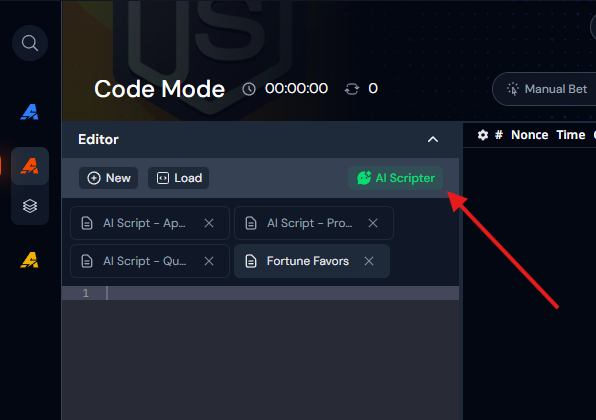
The fastest way to find out whether this is for you is to spend your 15 free messages. Open Code Mode, click AI Scripter, and describe the strategy you've been meaning to build but never wanted to code. There's nothing to activate first.
New to Antebot? Antebot AI is an add-on to Antebot Originals, and if you play through a linked affiliated casino account, Originals is on the house.
Need help? Join our Discord for support and tips from other users.